Upkeep User Guide & Visual Walkthrough
Complete visual walkthrough and reference manual for Upkeep.
Upkeep is a native macOS home maintenance manager built for multi-property households. It replaces fragile spreadsheets with a priority-weighted Health Score, a 14-day Open-Meteo Weather & Spray Window engine, Multi-Event Agronomic & Inspection Schedules, Contractor Sourcing & Bid Comparisons, Seasonal Procedure Checklists, and Major Home System Lifespan Tracking.
View on GitHub 🍳 Open Practical Cookbook →
1. Dashboard & Maintenance Intelligence
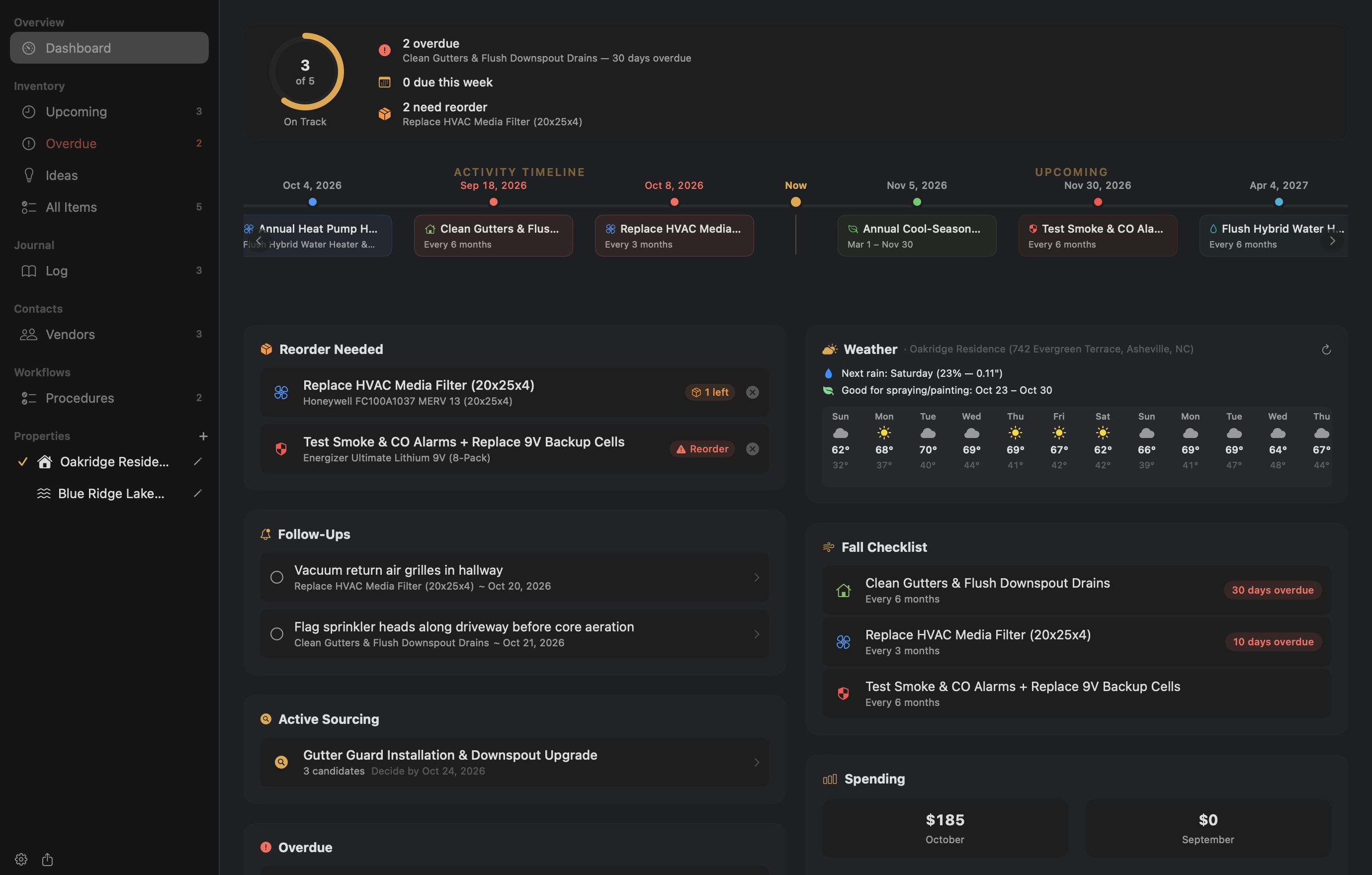
The Dashboard gives you an immediate operational view of every property in your household. At wider window sizes, it automatically switches into a two-column layout pairing your interactive timeline and action queues with local weather intelligence and spending analytics.
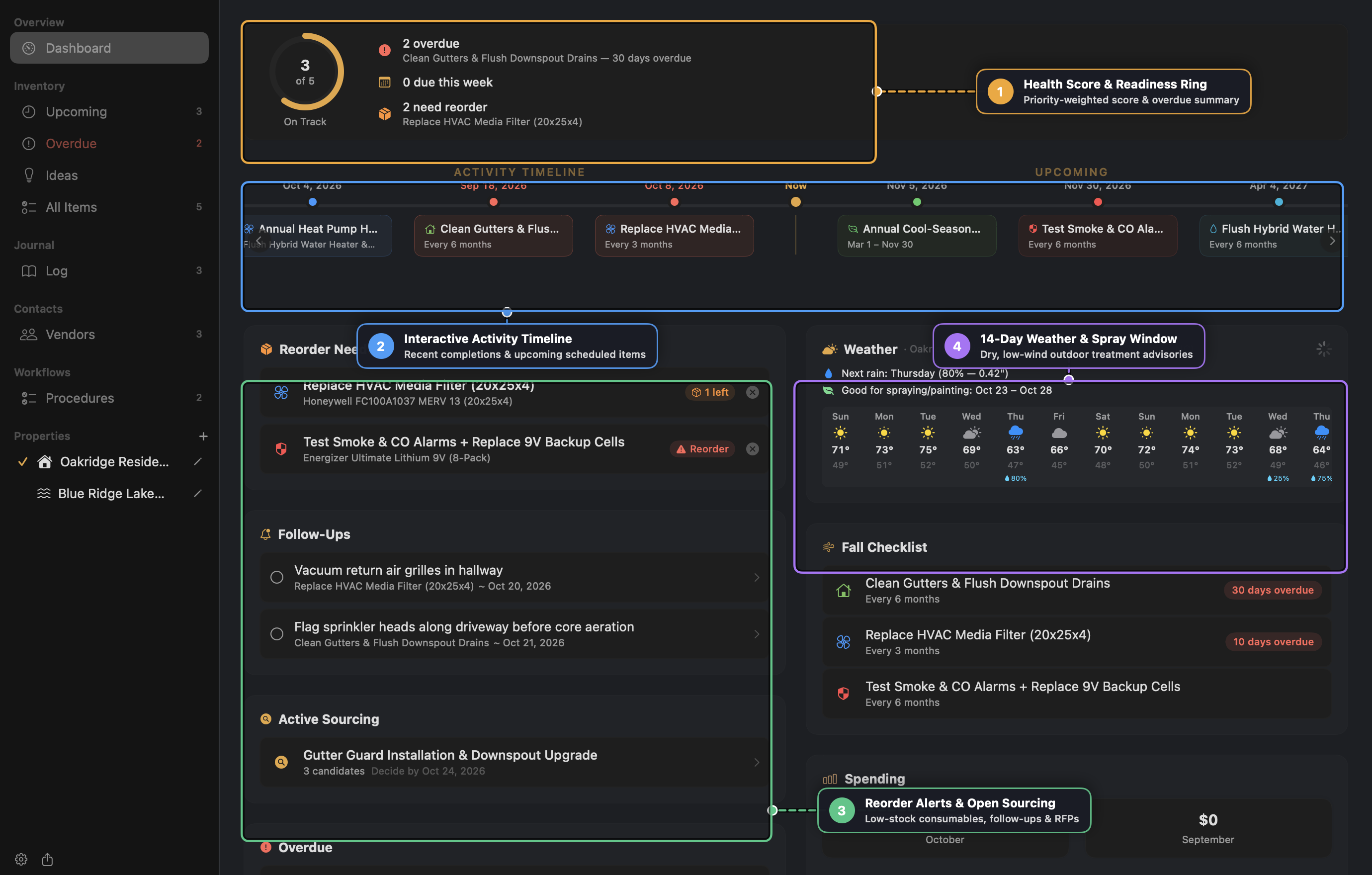
Callout Guide
- Health Score & Property Scope Pills:
- The circular On-Track Ring computes a priority-weighted health score across your active maintenance inventory (Critical = 4×, High = 3×, Medium = 2×, Low = 1×).
- Use the Property Scope Pills (All Properties, Oakridge Residence, Blue Ridge Lake Cabin) to filter every dashboard widget, timeline strip, and spending total to a single property or your entire portfolio.
- Interactive Maintenance Timeline:
- Switch between 7d, 14d, 30d, and 12m horizons to inspect both recent completions and upcoming due dates.
- Click any day column to drill into the exact tasks, seasonal windows, and multi-event stages scheduled for that date.
- Supply Reorder Alerts & Active Vendor Sourcing:
- Reorder Needed: Automatically surfaces items whose consumable
stockOnHandhas fallen below2 × quantityPerUse(or shows an Out of Stock badge whenstockOnHand < quantityPerUse). Reorder cards include a one-click product link and a Dismiss for 30d action that automatically resurfaces if stock is not replenished. - Active Sourcing: Highlights open contractor RFPs, candidate counts, and approaching Decide-By deadlines.
- Reorder Needed: Automatically surfaces items whose consumable
- 14-Day Weather Forecast & Optimal Spray Window:
- Powered by your property’s geocoded coordinates and Open-Meteo (no API key required).
- Automatically identifies the longest contiguous Spray Window (dry days with
< 50%precipitation probability,< 0.05"rain, wind< 10 mph, and gusts< 15 mph) so you can time fertilizer, herbicide, stain, and exterior sealant applications.
2. Maintenance Inventory & Multi-Event Schedules
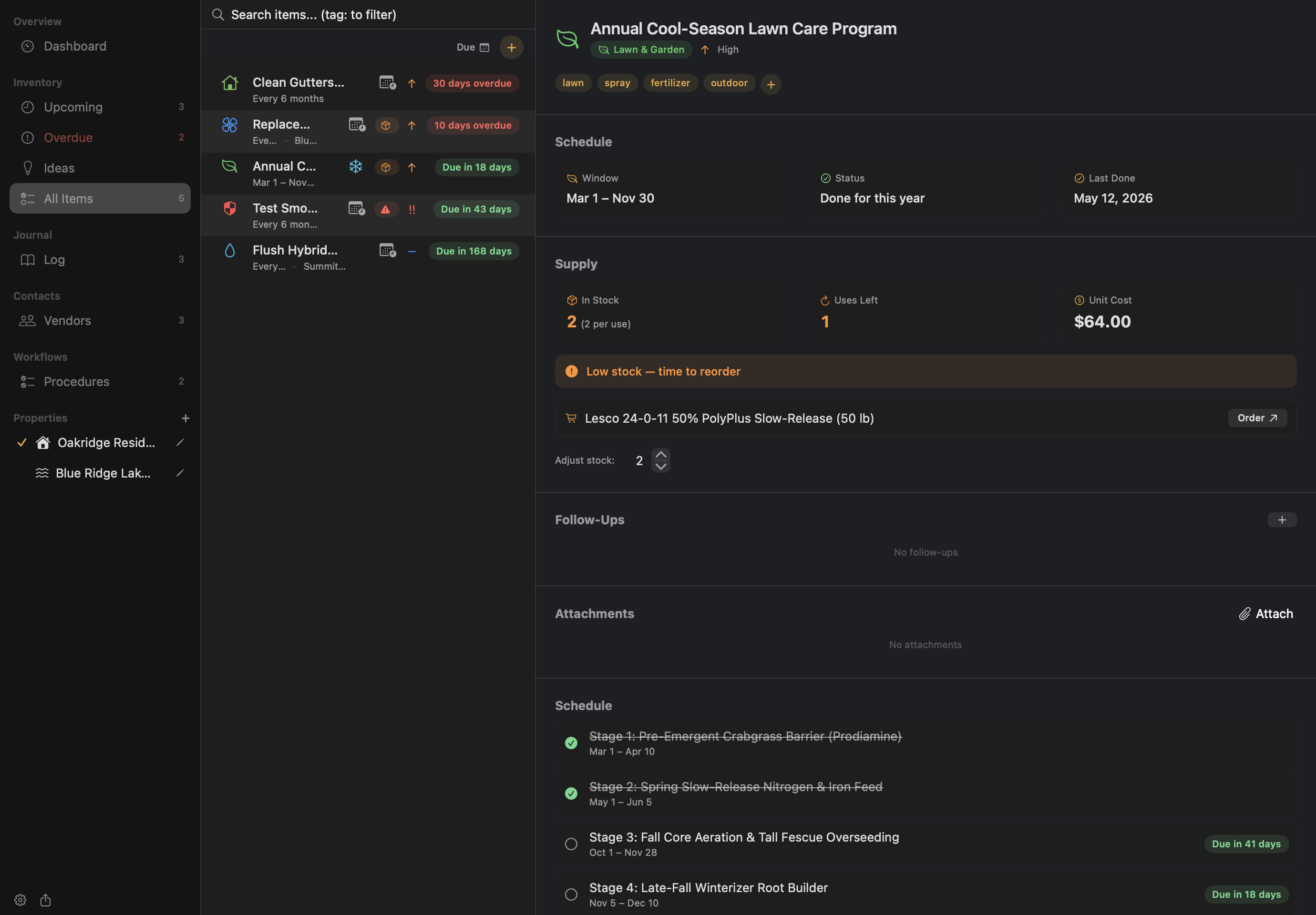
Upkeep organizes maintenance items across four schedule archetypes (Recurring, Seasonal, To-do, and Ideas) and supports Multi-Event Schedules (SubEvent) for complex annual programs.
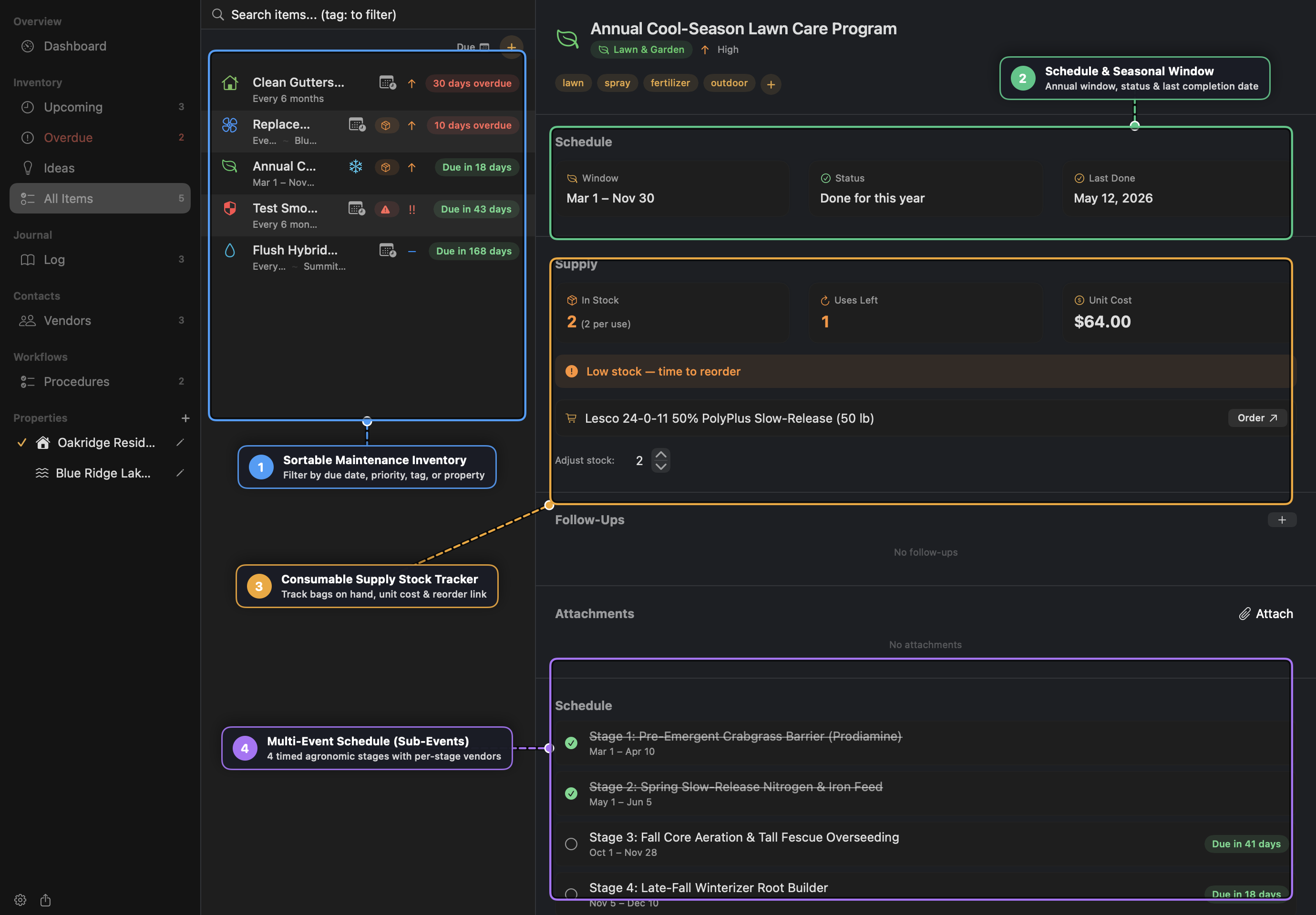
Schedule Types
- Recurring: Repeats every
Ndays, weeks, months, or years from the last completion date (or fromstartDateif never logged). - Seasonal: Anchored to an annual calendar window (such as
Mar 1 – Nov 30or cross-year windows likeNov 15 – Jan 15). Completing a seasonal item during its window marks it complete for the current cycle and schedules the next occurrence for next year’s window start. - To-do: A one-time repair or project with a target
Do bydate. Logging a completion automatically deactivates the To-do item (configurable in Settings). - Idea: An undated wishlist card for future renovations or upgrades where you can collect research notes, contractor quotes, attachments, and follow-up tasks before committing to a schedule.
Multi-Event Schedules (Sub-Events)
Instead of cluttering your inventory with 10 separate lawn-care or HVAC inspection items, attach timed Sub-Events to a single parent item:
- Each sub-event defines its own Seasonal Window (for recurring/seasonal items) or Due Date (for staged one-time projects).
- Each sub-event can optionally override the parent’s Vendor (for example, assigning Carolina Turf & Ornamental specifically to Stage 3: Fall Core Aeration & Overseeding while DIYing granular fertilizer stages).
- Logging work from a sub-event row tags the
LogEntrywith thatsubEventID, advancing only that stage while keeping remaining stages on track.
Outdoor Weather Advisories
Items in the Exterior, Lawn & Garden, or Seasonal categories (or tagged with outdoor keywords like spray, lawn, roof, gutter, deck, paint, or stain) display an inline Item Weather Hint banner on the detail pane. It warns of rain or high winds on the due date and recommends the next calm spray window.
Consumable Supply Tracking
Attach a Supply record to any item that consumes filters, salt bags, batteries, or treatment bags:
- Stock on Hand & Quantity per Use: Calculates exact Uses Remaining (
stockOnHand / quantityPerUse). - Auto-Decrement on Log: When you log a completion, Upkeep offers to decrement
stockOnHandbyquantityPerUseautomatically.
3. Vendors & Contractor Sourcing (RFPs)
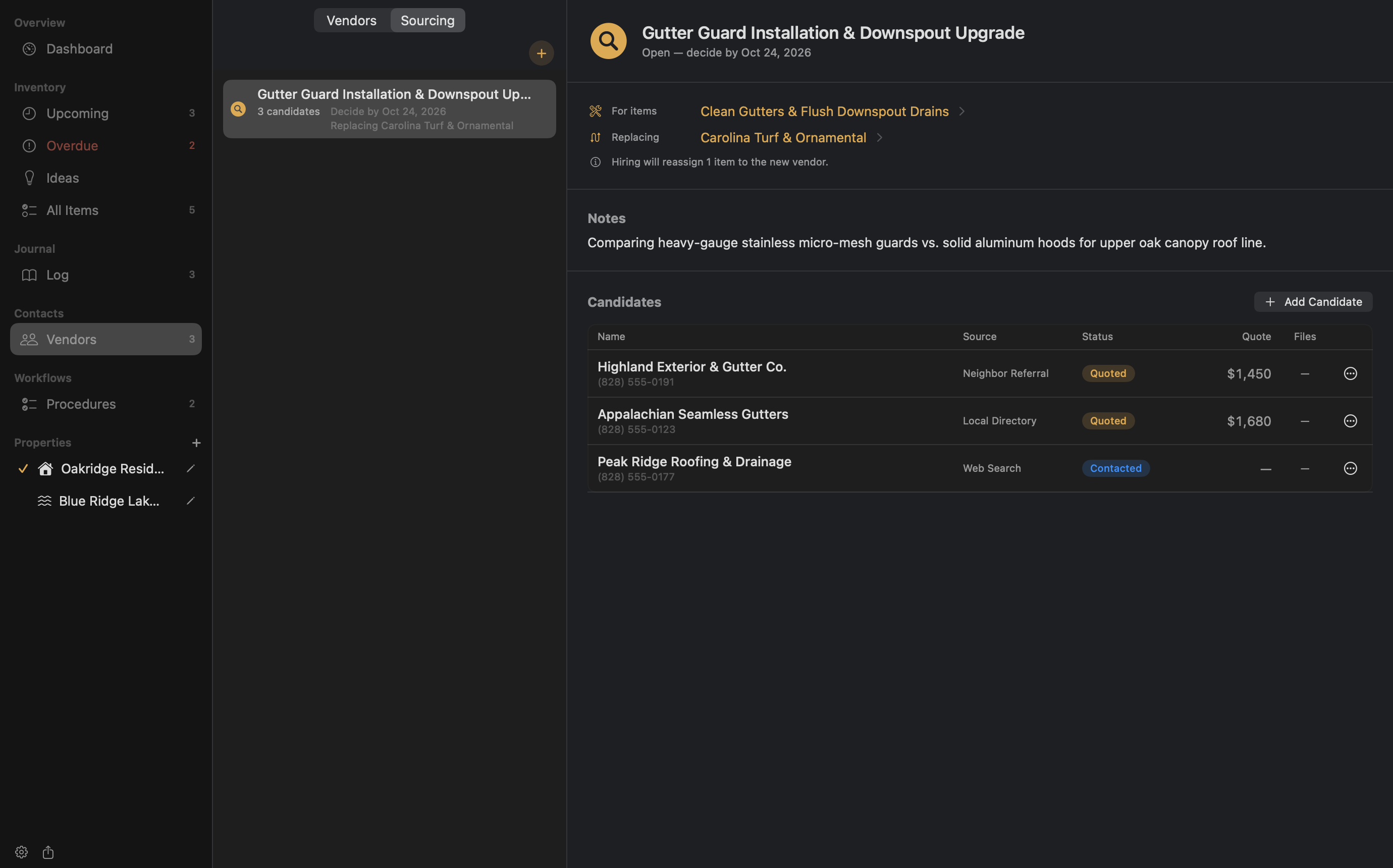
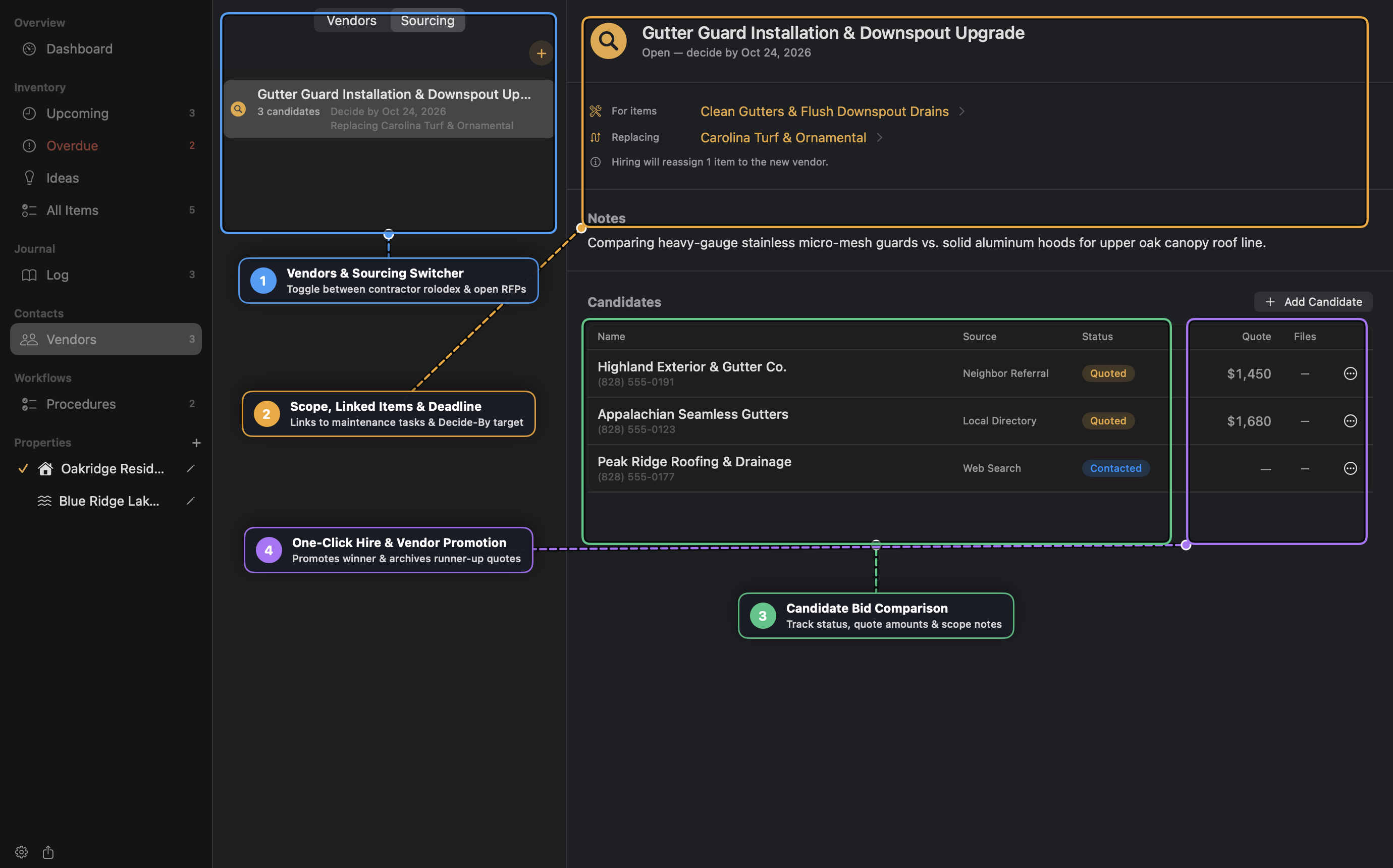
Upkeep separates your trusted contractor rolodex (Vendors) from active bid evaluations (Sourcing).
Managing Vendors
- Store phone numbers, email addresses, websites, specialties, Account Manager contacts, and Source notes (e.g., Neighbor Referral).
- Smart Location Links: Paste a street address, decimal coordinates (
35.5951, -82.5515), DMS coordinates, or a Google Maps Plus Code (849VCWC8+R9)—Upkeep turns it into a one-click map link. - Import from Contacts: Pull contractor vCards directly from macOS Contacts without granting broad address-book permissions.
Running a Vendor Sourcing (Bid Comparison)
When bidding out a new project or replacing an existing contractor:
- Switch to Vendors → Sourcing and click New Sourcing.
- Link one or more Maintenance Items, optionally select a Replacing Vendor, and set a Decide-By target date.
- Add Candidates as you reach out and advance their status through
Not contacted→Contacted→Quoted→Declined/Hired, recording each bid’s dollar quote and PDF estimate attachments. - Click Hire… on the winning candidate:
- The winning candidate is promoted to an active Vendor (or linked to an existing Vendor).
- All linked maintenance items—and, if replacing an incumbent vendor, every item assigned to the old vendor—are automatically reassigned to the winner.
- Other candidates who reached Quoted status are preserved as inactive Vendors in your directory so you retain their pricing and contact info for future work.
4. Seasonal Procedures & Major Home Systems
Seasonal Procedure Checklists
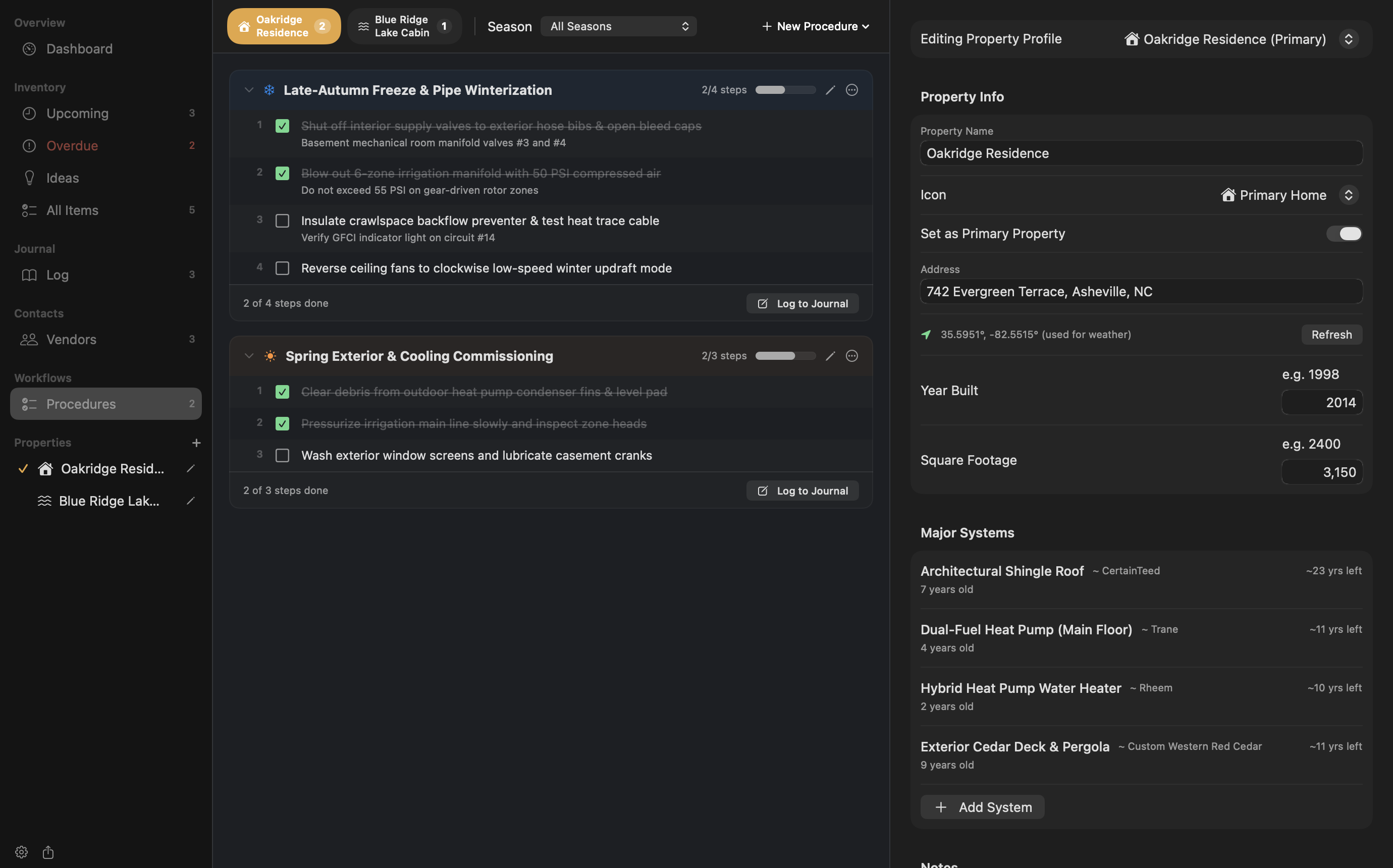
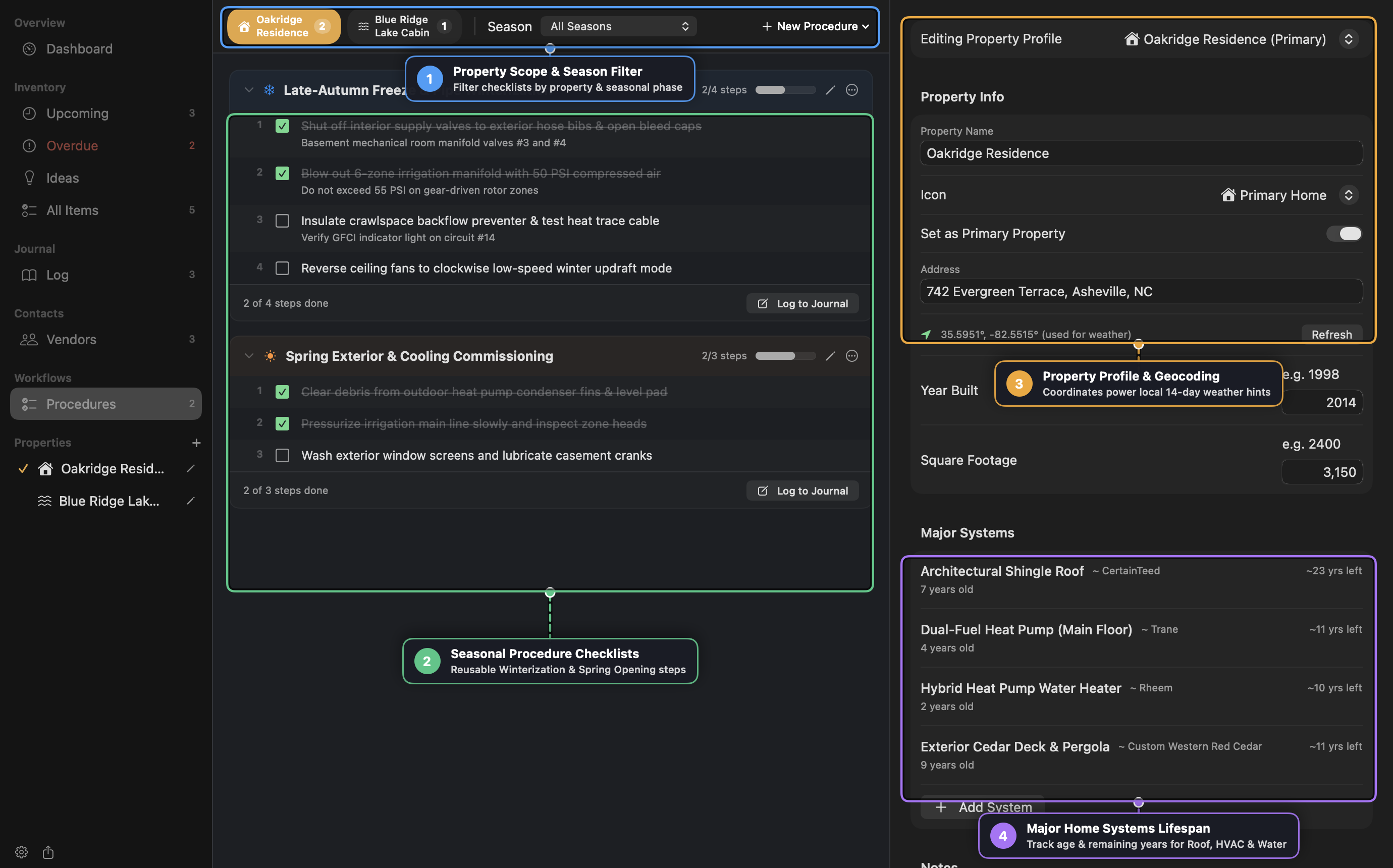
While Maintenance Items track individual tasks, Procedures (Procedures in the sidebar) guide you through ordered, multi-step seasonal workflows across five phases:
- Winterization (
snowflake) - Spring Opening (
sun.max.fill) - Seasonal Prep (
leaf.fill) - Home Inspection (
checkmark.shield.fill) - General Procedure (
checklist)
Each procedure card displays a live completion progress bar, step notes, and optional links to underlying MaintenanceItem records. When the next season arrives, click Reset for New Season (arrow.counterclockwise) to uncheck all steps while preserving your custom sequence and notes.
Multi-Property Profiles & Major Systems
Click any property under Properties in the sidebar to open the Property Profile:
- Geocoded Coordinates: Entering or refreshing a property address geocodes its latitude/longitude via macOS Core Location to power local 14-day weather forecasts.
- Major Home Systems: Track capital assets (Roof, HVAC, Water Heater, Exterior Deck, Septic, Dock) with brand, model, installation date, and expected lifespan in years. Upkeep calculates current system age and colour-codes remaining lifespan bars (Green → Amber
≤ 5 yrs left→ RedPast expected life).
5. Journal, Progress Logs & Shared Storage
Completion Logs vs. Progress Notes
When logging work (Cmd+Shift+N or Log Completion on an item):
- Record the completion date, total cost, performer (Self or Vendor), 1–5 star rating, Markdown notes, and photo/PDF attachments.
- Counts as Completion Toggle: Turn off “Counts as completion” to record a Progress Note (such as an inspection measurement, part serial number, or mid-project milestone) without resetting a recurring item’s next-due schedule or auto-deactivating a one-time To-do.
Household Sync & Conflict Detection
- Point Settings → Data Location at a shared folder (such as Google Drive, iCloud Drive, or Syncthing) so multiple household members can collaborate.
- Each member selects their identity in Settings, enabling the My Tasks Only filter and per-record version conflict detection (
ConflictBanner) if two macOS machines edit the same item simultaneously. - Automatic local backups are snapshotted to
~/.upkeep/backups/before destructive operations.
6. Keyboard Shortcuts & Tokenized Search
| Shortcut | Action |
|---|---|
Cmd+N | Create a new Maintenance Item (defaults to Idea when viewing Ideas) |
Cmd+Shift+N | Log a new Maintenance Entry |
Cmd+K / Cmd+F | Open Quick Search across items, sub-events, logs, vendors, and supplies |
Cmd+[ / Cmd+] | Navigate Back / Forward through cross-section drill-down history |
Tab / Down Arrow | Open or advance tag & filter auto-suggest dropdown |
Shift+Tab / Up Arrow | Move auto-suggest highlight backward |
Return | Commit highlighted tag or filter token |
Escape | Dismiss dropdown → clear filter field → close sheet |