Recruit User Guide & Visual Walkthrough
Complete visual walkthrough and reference manual for Recruit.
Recruit is a native macOS command center (Recruit.app) paired with an AI-assisted Go CLI (recruit) and background daemon (recruitd) for technical job discovery, intelligent fit scoring, opportunity pipeline execution, network leverage management, and interview mastery.
View on GitHub 🍳 Open Practical Cookbook →
1. Architecture & Hybrid Storage
Recruit separates its interactive macOS SwiftUI interface from its core Go data and AI engine:
- Native macOS App (
Recruit.app): Provides the multi-column workbench, drag-and-drop Kanban pipeline, Vim-enabled collateral editors (:_), interactive stage playbooks, and WhisperKit voice coaching. - CLI & Daemon (
recruit/recruitd): Executes multi-source job scraping, weighted AI fit scoring, Google Contacts/Gmail synchronization, and scheduled background routines. - Hybrid Storage:
- SQLite (
~/.local/share/recruit/recruit.db): Stores structured records across 25+ tables (jobs, opportunities, people, interactions, search firms, target orgs, prospect events, flashcards, and unemployment outreach logs). - Markdown Collateral (
~/.local/share/recruit/data/): Stores human-readable, Git-friendly Markdown files for tailored resumes, cover letters, company research briefs, gap-bridge worksheets, and interview preparation guides.
- SQLite (
- Dual-Mode AI Routing: Supports local Ollama inference and cloud providers (Google Gemini and Anthropic Claude) with automatic rate-limit handling, search-grounding fallback, and an Idle AI Queue that defers heavy background generation until your Mac is idle.
2. Dashboard & Daily Routine
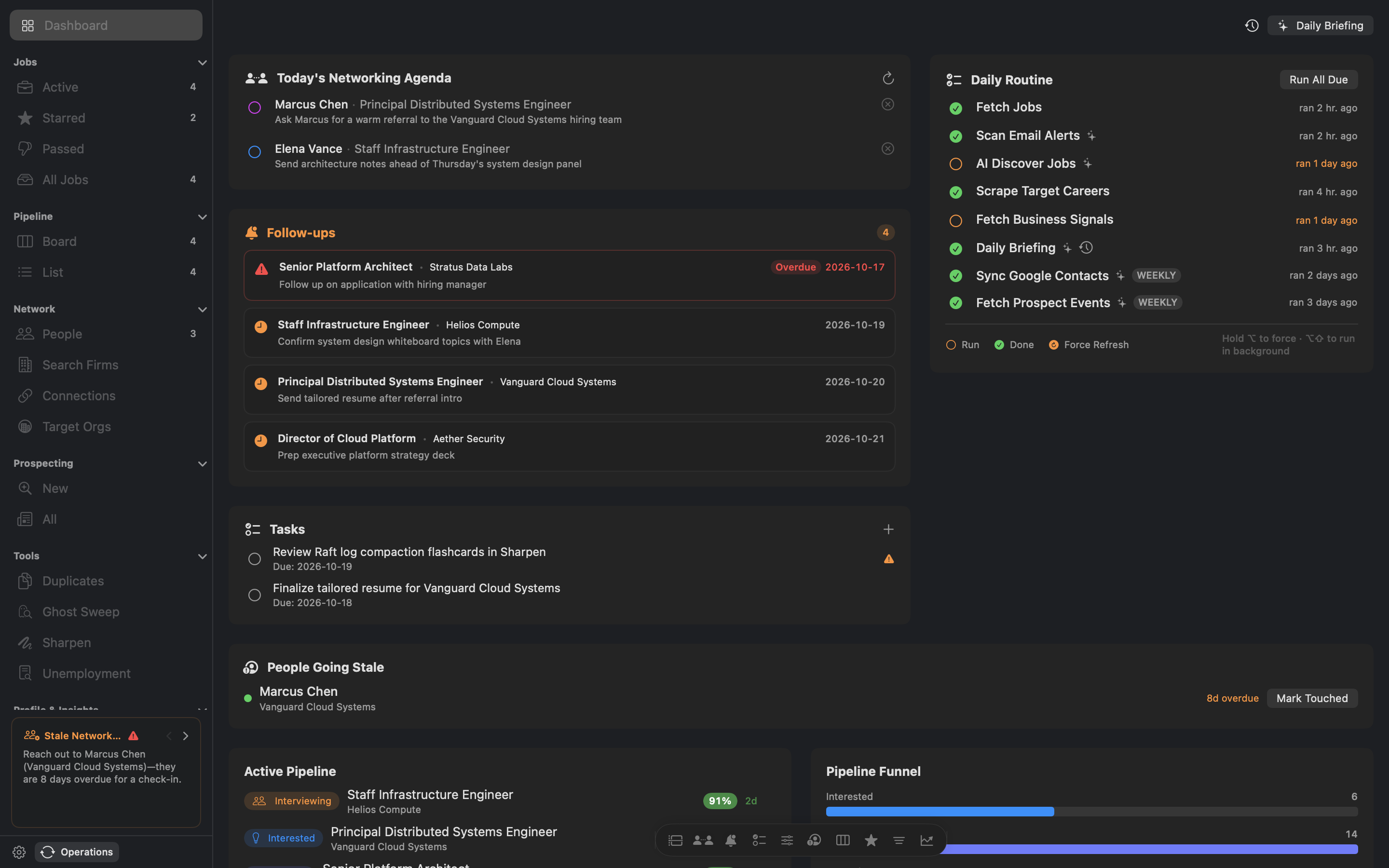
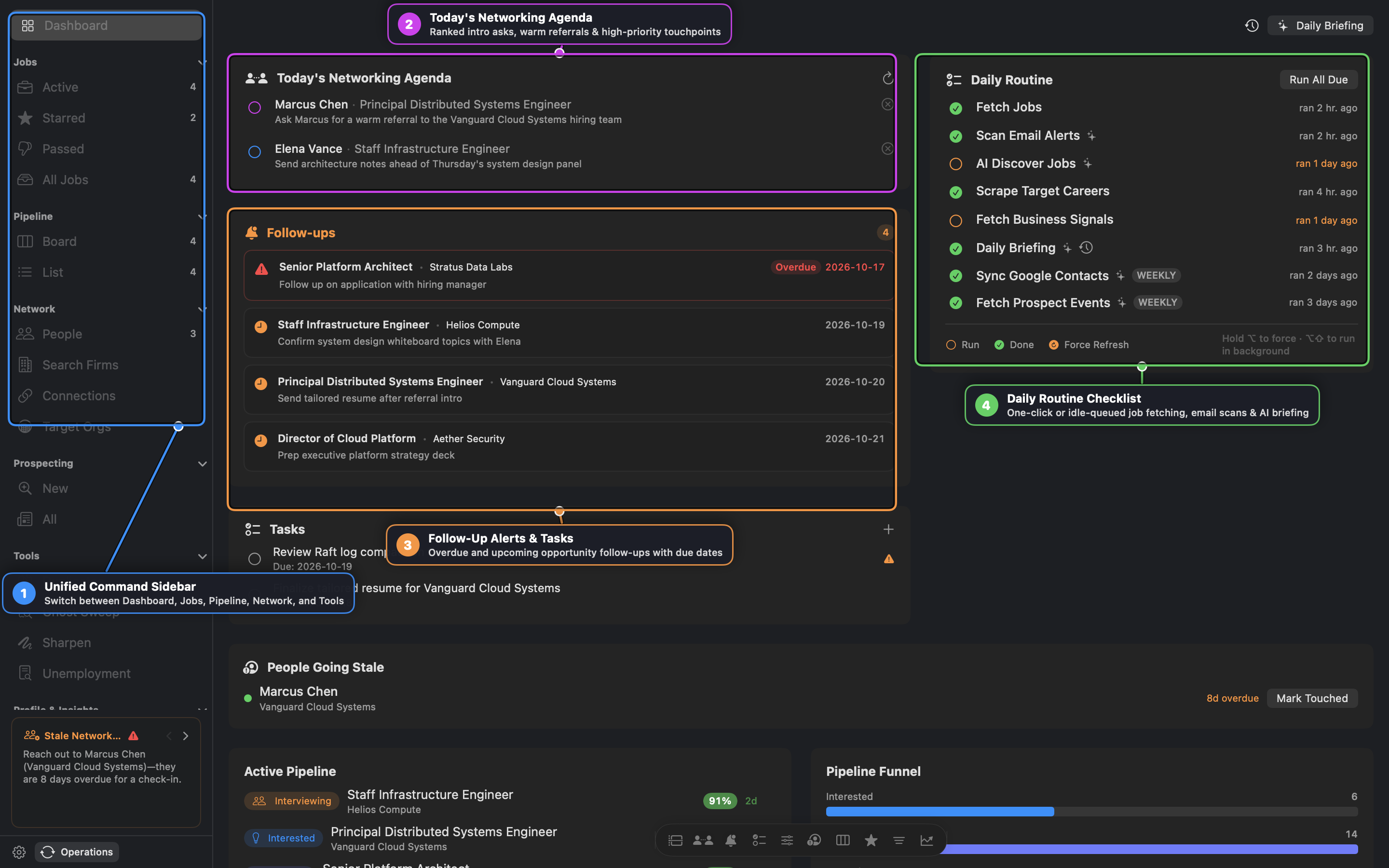
- Unified Command Sidebar: Navigate across the Dashboard, Jobs (
Active,Starred,Passed,All Jobs), Pipeline (Board,List), Network (People,Search Firms,Connections,Target Orgs), Prospecting, Tools (Duplicates,Ghost Sweep,Sharpen,Unemployment), and Profile & Insights. - Today’s Networking Agenda: Surfaces ranked, context-aware relationship actions—such as warm intro requests at companies with active openings, pre-interview check-ins, and high-priority referral follow-ups.
- Follow-Up Alerts & Tasks: Highlights overdue and upcoming opportunity follow-up dates alongside action items linked to specific opportunities or contacts.
- Daily Routine Checklist: Tracks daily and weekly automation tasks (
Fetch Jobs,Scan Email Alerts,AI Discover Jobs,Scrape Target Careers,Fetch Business Signals,Daily Briefing,Sync Google Contacts, andFetch Prospect Events). Click Run All Due or holdOption+Shiftto enqueue tasks into the background Idle AI Queue.
Interactive Widget Dock: Use the floating dock at the bottom of the Dashboard to toggle cards on or off and reorder your layout.
3. Job Discovery, Tokenized Triage & AI Fit Scoring
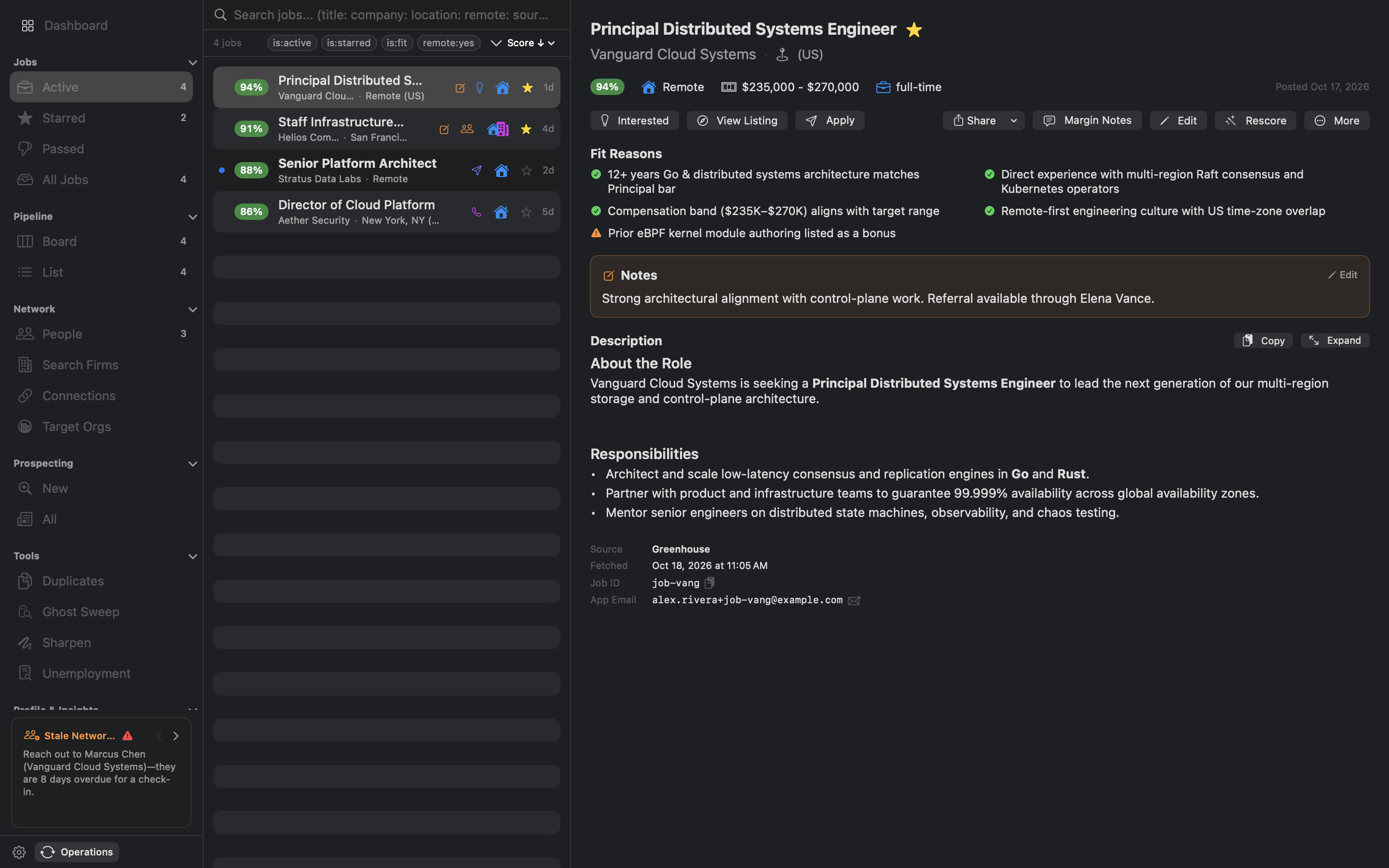
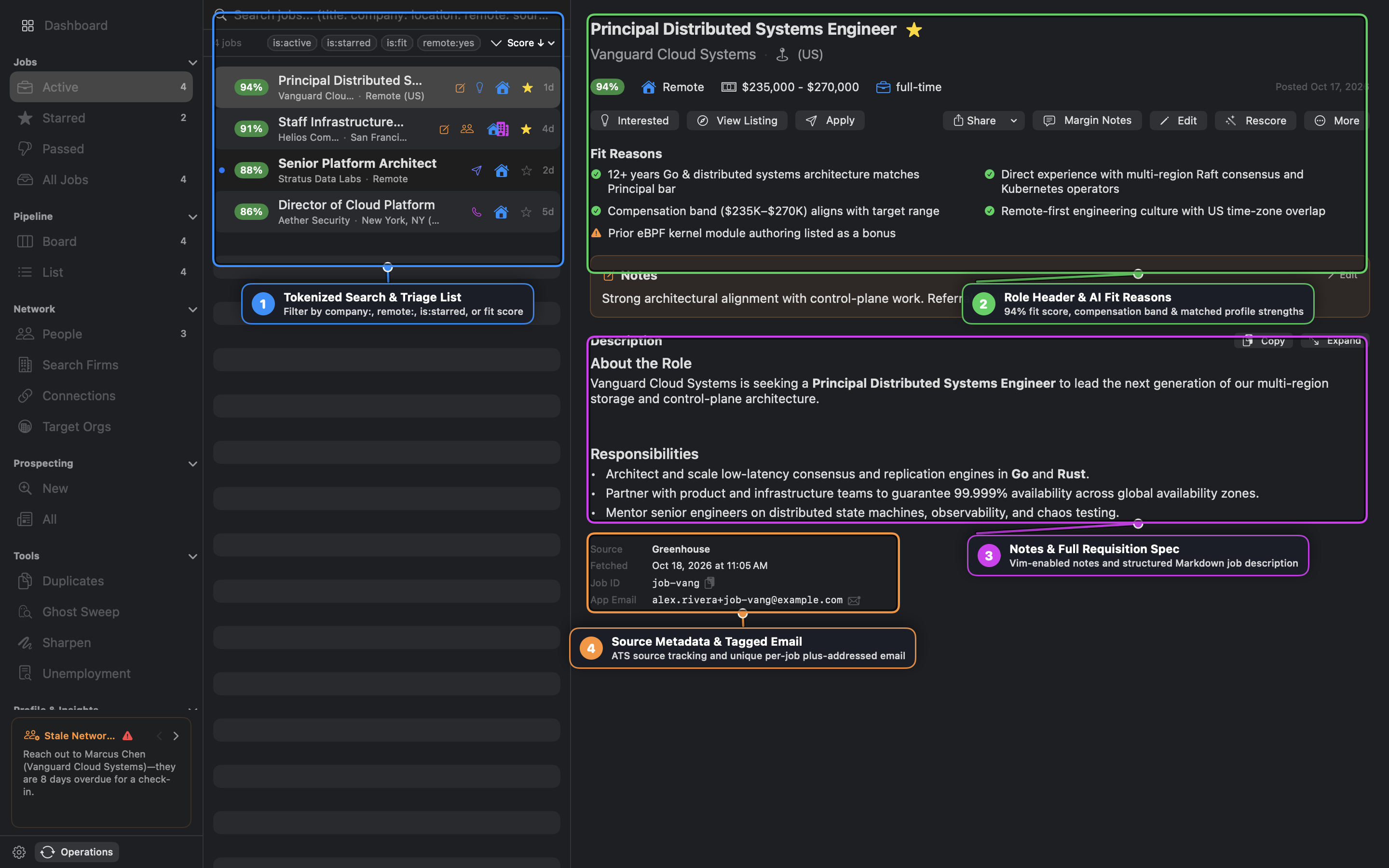
- Tokenized Search & Triage List: Filter hundreds of scraped listings using Stash-model
key:valuetokens (company:,remote:,source:,is:starred,is:fit,score:) withTabauto-completion and quick filter pills. - Role Header & AI Fit Reasons: Every listing is evaluated against your candidate profile (
profile.yaml) across role level, technical domain, skills overlap, compensation band, and remote/location preferences. Fit reasons clearly separate green profile matches from yellow gap warnings. - Notes & Full Requisition Spec: Add personal margin notes in a Vim-capable editor (
:_) and inspect the cleaned Markdown requisition spec without leaving the workbench. - Source Metadata & Tagged Email: Tracks the originating ATS (
Greenhouse,Lever,Ashby,Workday, or email alert) and generates a deterministic plus-addressed application email (e.g.,alex.rivera+job-vang@example.com) so inbound recruiter replies automatically correlate with the job.
Ghost Sweep & Duplicate Detection
- Duplicates (
Tools -> Duplicates): Groups cross-posted requisitions across multiple job boards and merges them while preserving notes and history. - Ghost Sweep (
Tools -> Ghost Sweep): Concurrently verifies HTTP liveness and ATS indicators to flag expired, filled, or stale “ghost” listings for one-click dismissal.
4. Pipeline Kanban & Interactive Opportunity Playbook
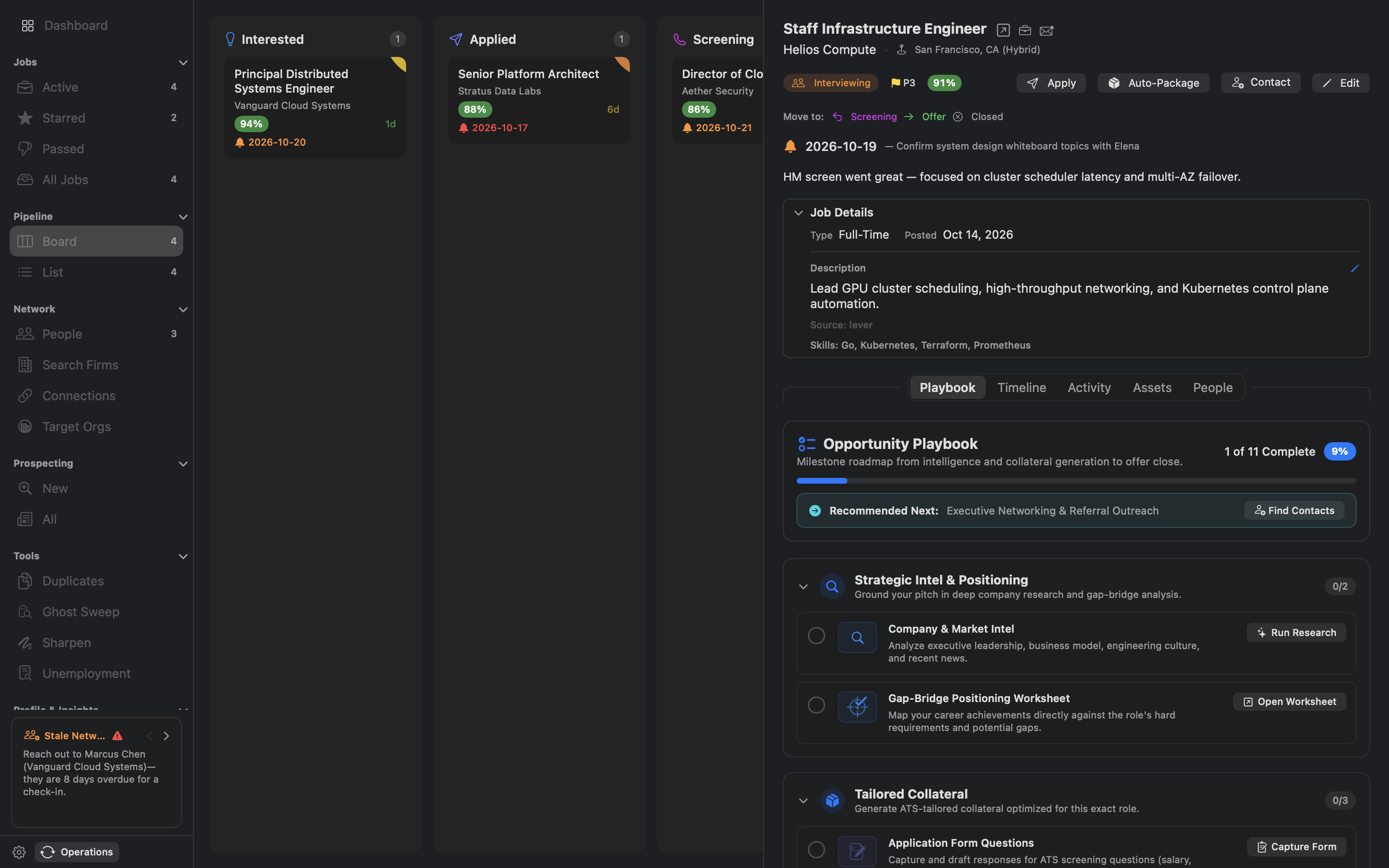
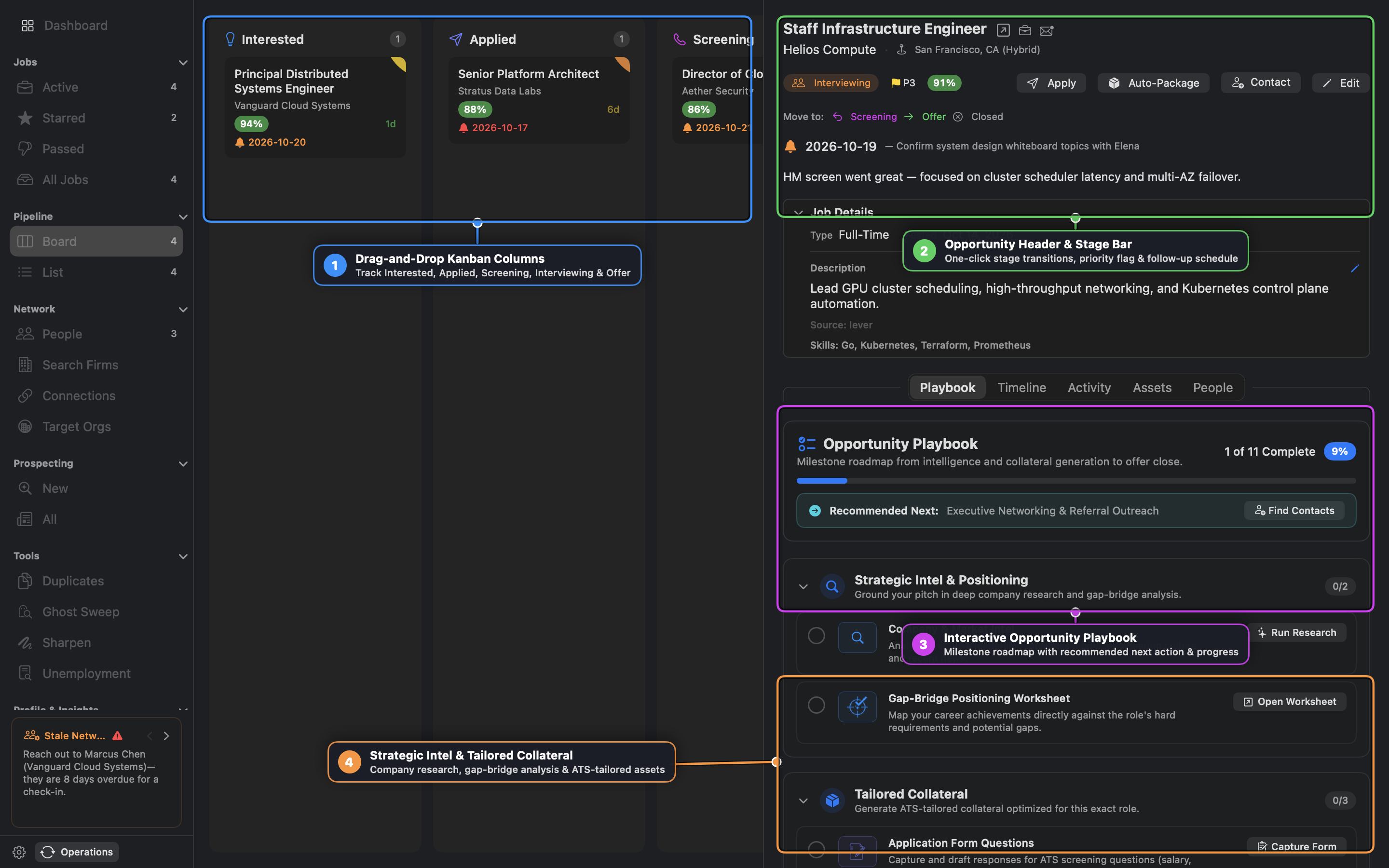
- Drag-and-Drop Kanban Columns: Move opportunities across
Interested,Applied,Screening,Interviewing,Offer, andClosed. Cards display fit score badges, days-in-stage counters, priority flags (P1–P3), and follow-up alarms. - Opportunity Header & Stage Bar: Transition stages with one click, launch Auto-Package (which generates a tailored resume, cover letter, and research brief in one batch), or open the Application Assistant side-by-side browser to auto-fill ATS forms.
- Interactive Opportunity Playbook: Guides each opportunity through an 11-milestone roadmap organized into four phases (
Strategic Intel & Positioning,Tailored Collateral,Outreach & Conversion, andInterview Mastery & Close), highlighting the single Recommended Next action. - Strategic Intel & Tailored Collateral:
- Company Research Brief: Synthesizes product architecture, engineering culture, recent funding/earnings signals, and executive leadership.
- Gap-Bridge Positioning Worksheet: Maps your career achievements directly against hard role requirements and frames mitigation narratives for potential skill gaps.
- Tailored Resume & Cover Letter Editors: Split-pane Markdown editors with Style Blueprint voice enforcement, ATS keyword coverage meters, PDF export, and a 3-Stage Verification Pipeline (
Claim Extraction -> Profile Grounding -> Fabrication Detection) that guarantees zero hallucinated metrics or employers.
5. Executive Network CRM & AI Leverage Scoring
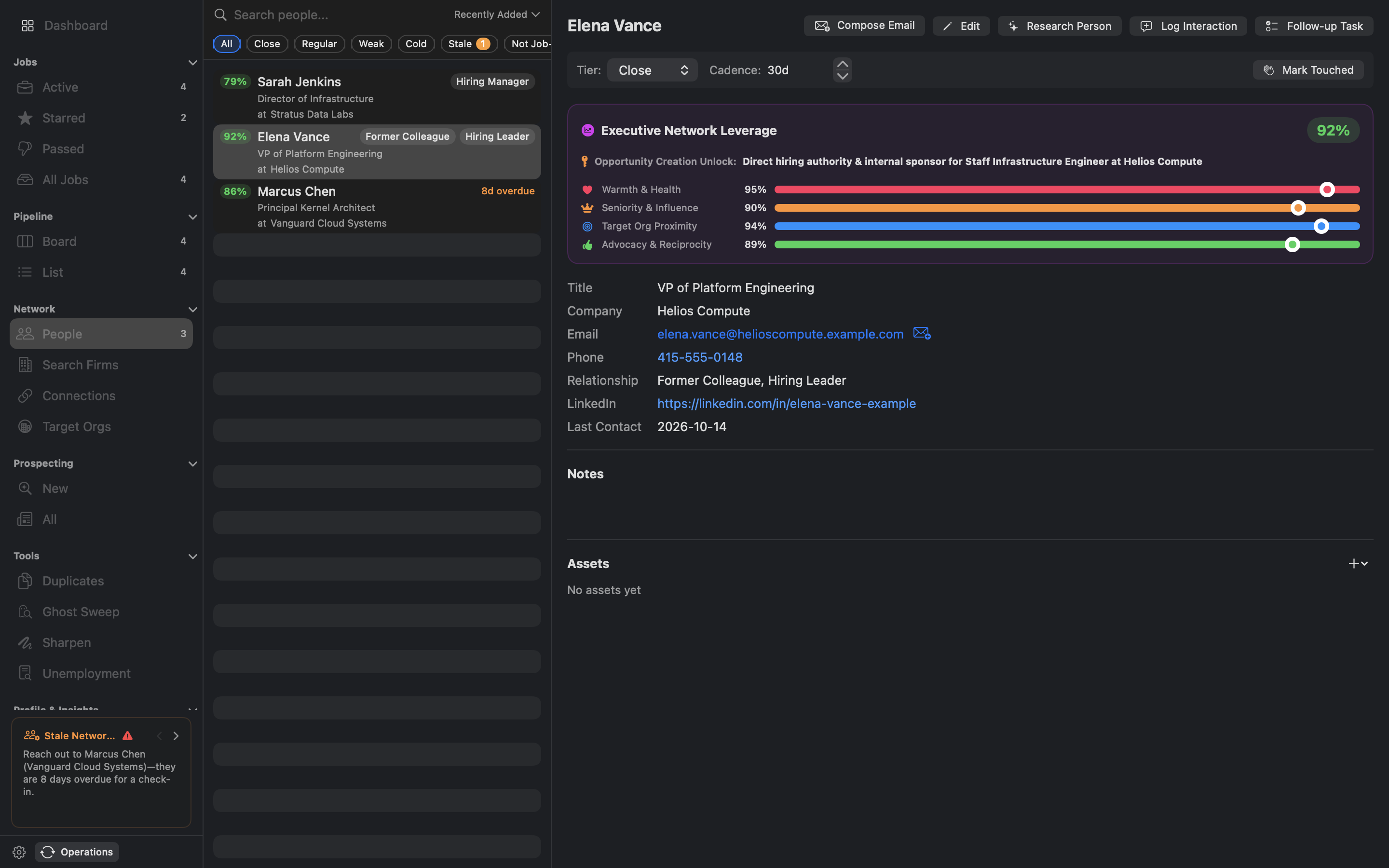
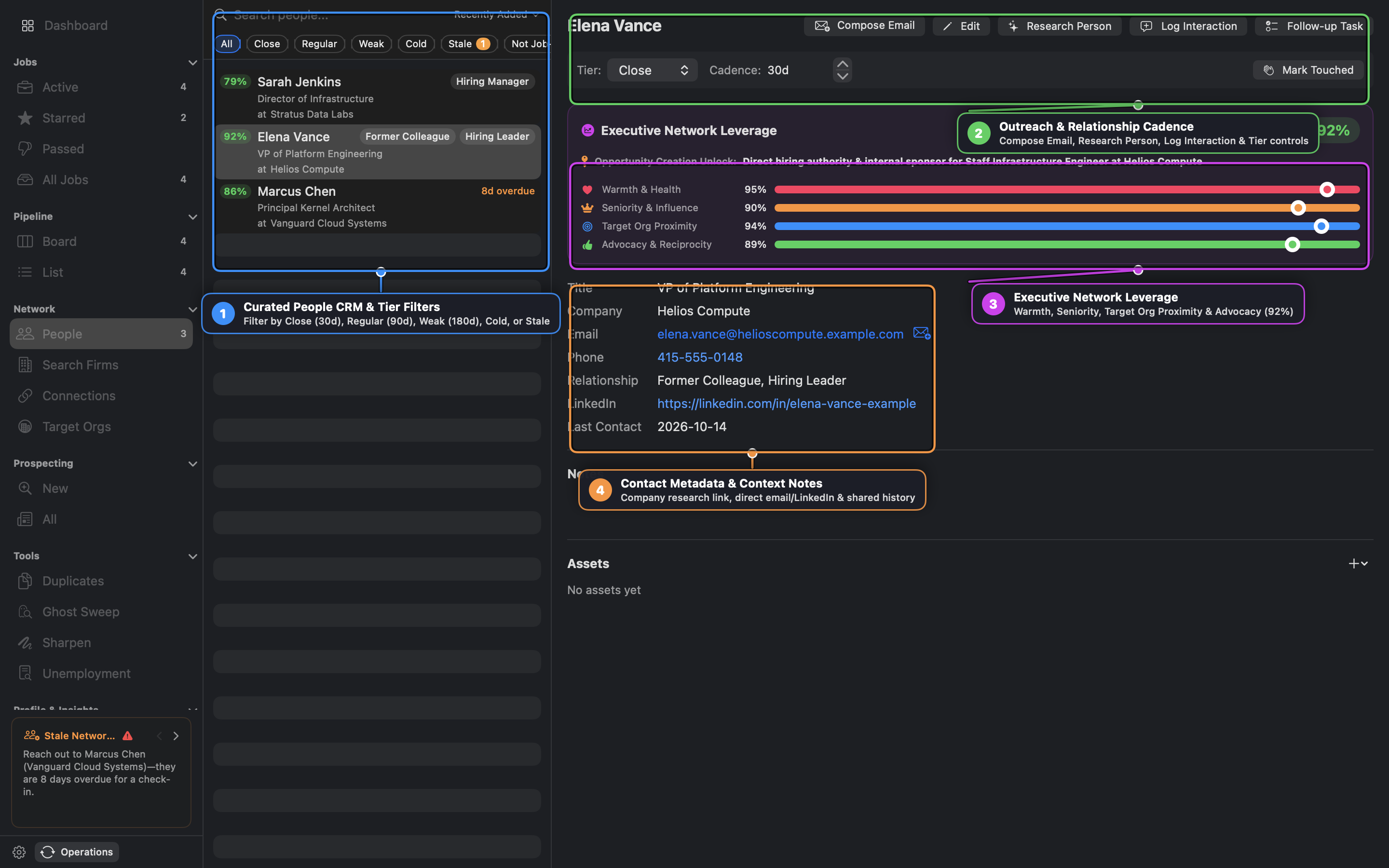
- Curated People CRM & Tier Filters: Organize your professional network into relationship cadence tiers—Close (30 days), Regular (90 days), Weak (180 days), and Cold—and immediately filter for Stale contacts overdue for a touchpoint.
- Outreach & Relationship Cadence: Draft context-aware outreach emails (
Compose Email), run deep background research (Research Person), log coffee chats or referrals (Log Interaction), and mark contacts touched with one click. - Executive Network Leverage: Computes a composite 0–100% leverage score across four dimensions—Warmth & Health, Seniority & Influence, Target Org Proximity, and Advocacy & Reciprocity—and surfaces an explicit Opportunity Creation Unlock explaining how the contact can help unlock an active role.
- Contact Metadata & Context Notes: Links contacts directly to Company Research pages, search firms, LinkedIn profiles, and interaction histories.
Search Firms, Connections & Target Orgs
- Search Firms: Track executive recruiting boutiques, retained search partners, and individual headhunters alongside their domain specialties.
- Connections (
connections.csv): Import your raw LinkedIn connections archive to cross-reference 1st-degree insiders at any company in your job feed before promoting key contacts into your curated People CRM. - Target Orgs & Prospecting: Monitor high-priority companies for leadership changes, funding rounds, expansion signals, and newly opened engineering requisitions.
6. Sharpen (Interview Prep), Audio Coaching & Unemployment Tracker
- Sharpen (
Tools -> Sharpen):- Spaced-Repetition Flashcards (SM-2): Drill system design, leadership narratives, and domain concepts with keyboard-first grading (
Spaceto flip,1–4forAgain,Hard,Good,Easy). - Practice Prompts & Voice Coaching: Record spoken answers to behavioral and architectural questions using local WhisperKit transcription and receive structured AI rubric scores on clarity, STAR structure, technical depth, and executive presence.
- Spaced-Repetition Flashcards (SM-2): Drill system design, leadership narratives, and domain concepts with keyboard-first grading (
- Live Interview Transcripts: Capture or import technical screen recordings, diarize speakers, and run AI post-mortems to extract questions asked and follow-up action items.
- Unemployment Outreach Tracker (
Tools -> Unemployment): Automatically logs qualifying job applications and networking activities by benefit week and exports audit-ready CSV/PDF compliance reports.
7. Keyboard Shortcuts & Built-In Consoles
| Shortcut | Action |
|---|---|
Cmd+K | Open Universal Command Palette (jump to any view, job, opportunity, contact, or action) |
Cmd+F / / | Focus tokenized search bar in the active list |
Tab / Shift+Tab | Cycle auto-suggest filter tokens (company:, stage:, tier:, is:) or slash commands |
j / k | Navigate down / up in Jobs, Pipeline, People, and Flashcard lists |
s / x | Star (s) or Pass/Dismiss (x) the selected job listing |
p | Promote the selected job listing to the Opportunity Pipeline |
Ctrl+` | Toggle the bottom Drop-Down Terminal & SQLite SQL Console |
Cmd+? | Open the searchable 24-topic in-app Recruit User Guide |